
Profit day
A day counts as a profit day if the change in balance between the start and the end of the day is at least 0.5% of the account's starting balance. The threshold is fixed at 0.5% of the starting balance for the whole trading period and is never recalculated.
The balance used in the calculation includes unrealised PnL on open positions. Profit is reflected in the balance on the day it appears, whether or not the position has been closed.
Example: how unrealised profit affects a profit day
Starting balance — $10,000.
Day 1. A position is opened with unrealised profit of +$500, bringing the balance to $10,500. The change over the day is +$500, or 5% — this is a profit day.
Day 2. The position is closed, the $500 becomes realised, and the balance stays at $10,500. The change over the day is zero, so the day is neutral: that profit was already counted on Day 1.
The key point: what matters is the growth in balance over the day, not the moment a trade is closed.
Challenge stages
A two-stage format. Both stages run on the same account, and positions are closed automatically between them.
| Parameter | Stage 1 | Stage 2 |
|---|---|---|
| Profit target (realised PnL) | 5% | 8% |
| Minimum profit days | 3 | 5 |
| Daily drawdown | 5% | 5% |
| Maximum drawdown | 10% | 10% |
One stage instead of two: a higher profit target and tighter drawdown limits.
| Parameter | Stage 1 |
|---|---|
| Profit target (realised PnL) | 10% |
| Minimum profit days | 3 |
| Daily drawdown | 3% |
| Maximum drawdown | 6% |
There is no assessment stage — trading starts on a funded account from day one.
| Parameter | Funded |
|---|---|
| Profit target | none |
| Minimum profit days | 5 |
| Daily drawdown | not applied |
| Dynamic drawdown | 6% of the highest balance |
Withdrawals are additionally subject to the 30% rule.
Risk parameters
Daily drawdown
The limit is measured from the balance at the start of the trading day and resets at 00:00 UTC. A loss from the previous day has no effect on the next day's limit — each day is assessed independently.
| Format | Limit | Example on a $10,000 account |
|---|---|---|
| Basic | 5% | a fall to $9,500 or below at any point in the day closes the account immediately |
| Accelerated | 3% | a fall to $9,700 or below closes the account immediately |
| Turbo | not applied | — |
Maximum drawdown
| Format | Calculation base | Limit | Example |
|---|---|---|---|
| Basic | starting balance | 10% | on $10,000 the challenge fails at $9,000 |
| Basic $200,000 (Stage 2 and funded) | starting balance | 8% | the account closes at $184,000 |
| Accelerated | starting balance | 6% | on $10,000 the challenge fails at $9,400 |
| Turbo | highest balance reached | 6% | see the calculation below |
In Turbo the drawdown is dynamic: the base is recalculated at every new balance high and lowered when profit is withdrawn. The interface labels this parameter "Dynamic drawdown".
Example: how dynamic drawdown is calculated in Turbo
Day 1. Starting balance — $10,000.
Day 5. The balance grows to $12,000, which becomes the new highest balance. The drawdown limit is recalculated from it: 6% of $12,000 is $720, so the minimum allowed balance is $11,280. A fall to $11,279 closes the account.
Day 15. $1,000 is withdrawn, leaving $11,000. The highest balance drops to $11,000, the new minimum allowed balance becomes $10,340, and the permitted fall narrows from $720 to $660.
Funded account conditions
The risk parameters of a funded account depend on which challenge was completed.
| Parameter | After Basic | After Accelerated | Turbo |
|---|---|---|---|
| Daily drawdown | 5% | 3% | not applied |
| Maximum drawdown | 10% of the starting balance (8% for new Basic $200,000) | 6% of the starting balance | 6% of the highest balance (dynamic) |
| Profit days required for withdrawal | 5 | 5 | 5 |
| Minimum gain on a profit day | 0.5% | 0.5% | 0.5% |
Profit days accumulate with no time limit: if you pause your trading, the days already earned are kept.
Maximum allocation
The combined notional of one trader's Basic and Accelerated funded accounts is capped at $400,000 and counted from the accounts' starting balances rather than their current ones: an account that has grown from $200,000 to $230,000 still occupies $200,000 of the cap. The cap applies at the funded stage: completed challenges above it are not lost.
Turbo accounts have a separate cap of $100,000, independent of the general one. The amount used on Basic and Accelerated does not reduce the Turbo cap, and vice versa.
What happens when the cap is exceeded, how the "Paused" status works and how to activate an account are covered on the Scaling page.
Rules for accounts with the API option
When the API Trading option is active on a challenge, two additional rules apply to the account: the 60-second profit adjustment and the 30% rule.
Both apply to the entire account regardless of how an operation was performed — manually in the terminal or through the API. The order type makes no difference either: market, limit, stop loss, take profit and trailing stop are all treated the same way. The option cannot be switched off, so the rules stay for the life of the challenge.
60-second profit adjustment
The rule applies on every phase of the challenge, the funded stage included. Every time a position is opened or increased, a 60-second window starts. If the position is fully or partially closed within that window at a profit, that profit is not counted towards the account's result.
- A negative result on the close is counted in full.
- Commissions, funding and other trading costs are not zeroed and are applied as usual.
- Every new increase restarts the 60-second window, counted from the moment of the last increase.
- Once 60 seconds have passed, the result of a close is counted as normal.
The rule also applies when the balance is recorded at the start of a new day: if less than 60 seconds have passed since the last open or increase at 00:00 UTC, unrealised profit is left out of the day's starting balance. A negative result is included in full.
The operation history stores the raw result, the adjusted result and a marker showing the rule was applied. Position and account totals use the adjusted figure.
Example
A position opens at 12:00:00 and closes at a $180 profit at 12:00:40 — 40 seconds later, so that profit is not counted and the history shows 0 USD. Opening and closing commissions are charged as usual.
Had the same position closed at 12:01:10, the $180 would have counted in full.
If the position was increased at 12:00:30, the window restarts: a profitable close before 12:01:30 is adjusted.
Profit split
Once an account reaches funded status, profit is split between the trader and the platform.
| Scheme | Trader's share | Upscale's share | Payout on $1,000 of profit |
|---|---|---|---|
| Standard | 80% | 20% | $800 |
| Upgrade bought with the challenge | 90% | 10% | $900 |
The 90/10 upgrade is activated at the moment the challenge is purchased and makes the most difference with consistent profitable trading.
Withdrawing profit
The payment period runs from the launch of the account — for a first withdrawal — or from the last successful withdrawal.
To request a withdrawal you need to:
- reach at least 5 profit days within the current payment period;
- stay within the daily and maximum drawdown limits;
- satisfy the 30% rule — on Turbo accounts and accounts with the API option;
- close any positions on paused RWA markets.
Full conditions, limits by account size and payout networks are covered on the Withdrawal Rules page.
The 30% rule
This restriction applies to Turbo accounts and to accounts with the API option. If the single most profitable day accounts for 30% or more of total profit, the result is treated as insufficiently even.
| Account type | How it applies |
|---|---|
| Turbo | a condition for withdrawal: until the rule is satisfied, no request can be made |
| API option, challenge stages | a condition for passing each stage: until the rule is satisfied, the move to the next stage is unavailable |
| API option, funded stage | a condition for payout eligibility |
Example: how the 30% rule is calculated
Five profit days: +$200, +$300, +$1,500, +$300, +$200. Total profit — $2,500.
The best day contributes $1,500, or 60% of the total — withdrawal is unavailable.
For that day's share to fall to 30%, total profit has to reach $1,500 ÷ 0.30 = $5,000. That means earning another $2,500. After that, the large day accounts for exactly 30% and withdrawal opens up.
The more evenly profit is distributed across days, the sooner withdrawals become available.
Hedging and copying trades
The rules below concern trading accounts — the individual accounts you get with each challenge — and not your Upscale login, under which several trading accounts can be held at once.
Hedging
Hedging means holding opposite positions (long and short) in the same instrument at the same time to offset risk.
- Within one trading account — allowed. A long and a short position in the same instrument can be open together on the same challenge account.
- Across two or more trading accounts — prohibited. You may not hold positions in the same instrument in opposite directions on different accounts — a long on BTC on one account and a short on BTC on another, for example. The restriction applies to every trading account held by the same trader, including accounts on different challenges and accounts of different sizes.
- If one account already holds positions in both directions in an instrument, you may not open a position in that same instrument on another account.
Identical same-direction trades across several accounts of the same trader are allowed: a long on BTC on two of your accounts at once, for example.
Copying trades between traders
Similar strategies are not prohibited: overlapping trades between traders who use the same approach are perfectly normal.
What is prohibited is systematically copying another Upscale trader's trades — manually, through the API, a trading bot, a signal service or any other automation. Systematically mirrored trading between different traders, where the instrument, direction, timing and relative position size all match, may be treated as one person running several accounts (multi-accounting).
An API key is meant for the account owner only: it must not be shared with other traders.
Closing index positions before the weekend
The US500, NAS100, US30, US2000, GER40 and EU50 indices trade on a 23/5 schedule and close for the weekend. To keep fresh positions from being carried over a closed market, a forced-close rule applies to them. Times are New York time (America/New_York).
| Friday, ET | US indices | GER40 and EU50 |
|---|---|---|
| Control period: positions opened or increased during this time are flagged for closure | 15:00–16:59 | 14:00–15:59 |
| Forced close: flagged positions are closed in full at market price, and linked stop loss, take profit and trailing stop orders are cancelled | 16:59 | 15:59 |
| Close-only mode: positions cannot be opened or increased, but can be reduced or closed | 16:59–17:00 | 15:59–16:00 |
| The market is closed until the next weekly session starts | from 17:00 | from 16:00 |
- Increases count too. If a position was opened before the control period but increased during it, the whole position in that instrument is closed, not just the added volume.
- Positions opened before the control period and not increased afterwards are not affected and are carried over the weekend as usual.
- The rule applies regardless of the position's direction and size, profit or loss, challenge format and stage, and whether it was opened in the terminal or through the API.
In the operation history such a position shows the note: "The position was automatically closed before the weekend."
Example
On Friday at 11:00 ET a $5,000 long on US500 is opened. At 15:30 ET the position is increased by another $10,000. At 16:59 ET the whole $15,000 position is closed at market price.
Without the increase at 15:30, the $5,000 position would have stayed open over the weekend. For GER40 and EU50 everything works the same way, one hour earlier: the control period starts at 14:00 ET and the close happens at 15:59 ET.
Moving between stages
Applies to Basic only.
Once every condition of the stage is met, a button to move on appears on the account, so the trader picks the moment — you can finish working an open position first, for example. If a single profit day is all that remains, the move happens automatically as soon as that day is counted.
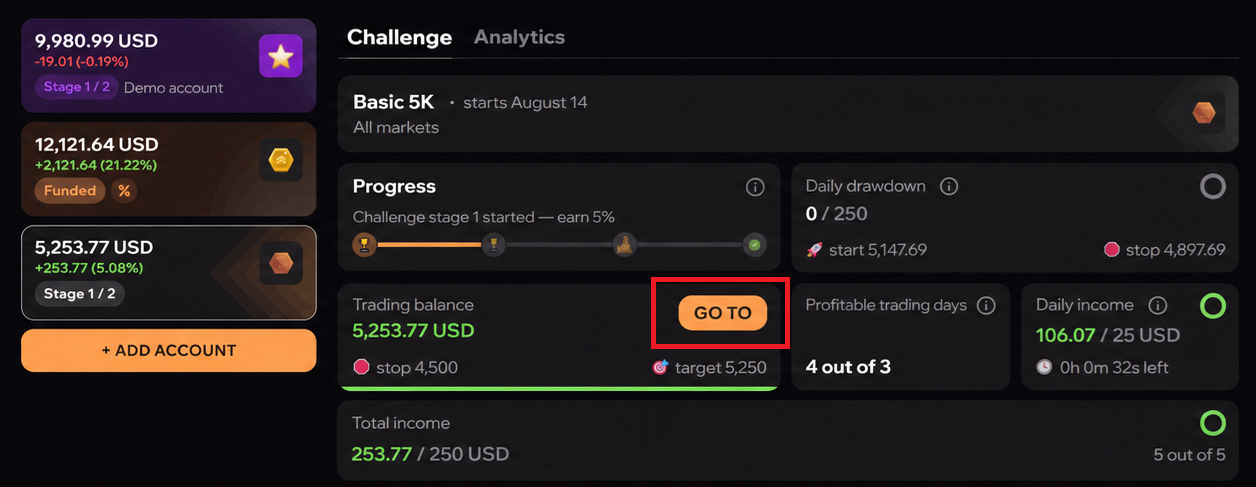
When an account moves to the next stage, all open positions are closed at market price and pending limit orders are cancelled.
Result check on the move
Once positions are closed, the platform checks the actual trading result of the stage — realised PnL including commissions and funding — against the profit target. The check guards against cases where the balance reached the target because of a technical failure rather than through trades. It runs on real accounts; demo accounts do not have it.
- The result matches the target. The check takes a few seconds and the move happens automatically. While it runs, the move button shows a loading indicator and cannot be pressed again.
- The result does not match. The move is not performed and the account goes to manual review. Trading is temporarily blocked, the move button is replaced by an "Under review" button, and a banner above the chart explains why. The chart, account metrics and operation history stay available.
Once a decision is made, the account status updates automatically: either the move to the next stage is confirmed, or the account returns to active status on the current stage — trading is unblocked and the move can be requested again once the conditions are met.
If the review takes longer than 12 hours, a "Contact support" button appears in the "Under review" window.
Breaches and account closure
| Situation | Consequence |
|---|---|
| The minimum number of profit days is not reached | The account stays active and trading continues, but withdrawal is unavailable until the requirement is met |
| A daily or maximum drawdown limit is breached | The account closes immediately and all accumulated profit is forfeited |
When an account closes, all open positions are force-closed at market price, pending limit orders are cancelled, and access to the account is revoked permanently.